Know what your AI is doing
Intentra monitors AI coding assistants like Cursor and Claude Code. Detect security violations, ensure compliance, and get complete visibility into how AI tools interact with your codebase.
curl -fsSL https://install.intentra.sh | shFree and open source
See Intentra in action
From installation to insights in under a minute
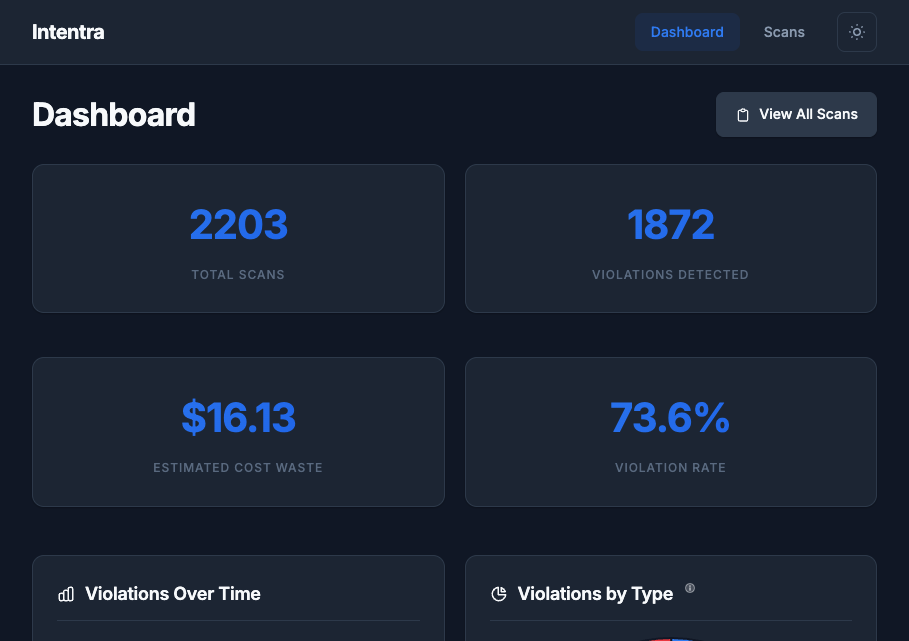
Zero-friction setup
One command to install. Configure your API credentials. Hooks automatically sync data to your centralized dashboard.
Centralized monitoring
All AI activity streams to your hosted dashboard at app.intentra.sh. Monitor your entire team from one place.
Actionable insights
Security violations and behavioral issues highlighted automatically. Full audit trails for compliance.
What exactly is a "scan"?
A scan is a complete AI interaction session — from your prompt through all tool calls and responses. Each scan is analyzed for security and compliance.
🔍What gets monitored?
Technical note: A scan aggregates 3-5 LLM API calls1 grouped by user intent. All tool calls, file accesses, and code changes within a session are captured for analysis.
1 Average based on analysis of 100+ real AI coding sessions across Cursor and Claude Code. Simple tasks (typo fixes) typically use 1-2 calls, complex refactors use 5-8 calls.
AI Usage Monitoring
Full visibility into how AI coding assistants are being used across your organization
Complete Visibility
Track every AI interaction across your team. See what prompts were sent, what code was generated, and how your tools are being used.
Violation Detection
Automatically identify problematic AI patterns: retry loops, ignored instructions, excessive token usage, and more.
CLI-First Architecture
Single Go binary. No IDE extensions required. Works with Cursor, Claude Code, and any future AI coding tools.
Centralized Logging
Stream AI session data to your server in real-time. HMAC-authenticated API with automatic buffering and retry.
Self-Hosted Control
Deploy to your own infrastructure. Your data stays on your servers with Cognito auth and configurable device policies.
Security & Compliance
Detect secrets exposure, PII leaks, and policy violations. Export audit logs and violations to JSON/CSV for compliance.
Trusted by developers
See what early users are saying about Intentra
“We finally know what our AI tools are doing. Intentra gave us complete visibility into how Cursor is being used across the team.”
“The violation detection caught patterns we didn't even know were problems. Our AI usage is now 30% more efficient.”
“Compliance required us to audit AI tool usage. Intentra made that trivial with centralized logging and full audit trails.”
Join developers1 monitoring their AI coding tools
1 User count based on early adopters (as of January 2026).
2 Total AI coding sessions tracked across all users since platform launch in January 2026.
3 Violations detected including retry loops, context waste, and ignored instructions.
4 Intentra is fully self-hosted. Your data stays on your infrastructure.